The short answer
01
Choose the right creation mode
The best mode depends on what is already fixed in your idea. Do not write full lyrics just because Advanced looks more powerful; added control helps only when you know what you want to control.
Simple Creation
Best for a first draft, a mood, an event, an instrumental or a song idea without finished lyrics.
You provide the creative brief. YinsoAI develops the song.
Lyrics Creation
Best for shaping specific words, memories and song sections—whether you write the lyrics yourself or develop them with AI.
Shape the lyrics and style, with AI help when you need it. YinsoAI turns them into a performance.
02
How to use Simple Creation
- 1
Open Simple mode
Choose Simple at the top of the Create panel. This mode turns one natural-language description into a complete song direction.
- 2
Describe the song
Write the subject, genre, mood, vocal direction, key instruments and the kind of chorus or energy change you want. One clear paragraph is enough.
- 3
Choose vocals or instrumental
Leave Instrumental off when you want singing. Turn it on for background music, podcast intros, games or videos where narration should stay clear.
- 4
Create and compare
Generate the song and listen past the introduction. Compare the vocal, chorus, mood and arrangement before changing one important detail for the next version.
03
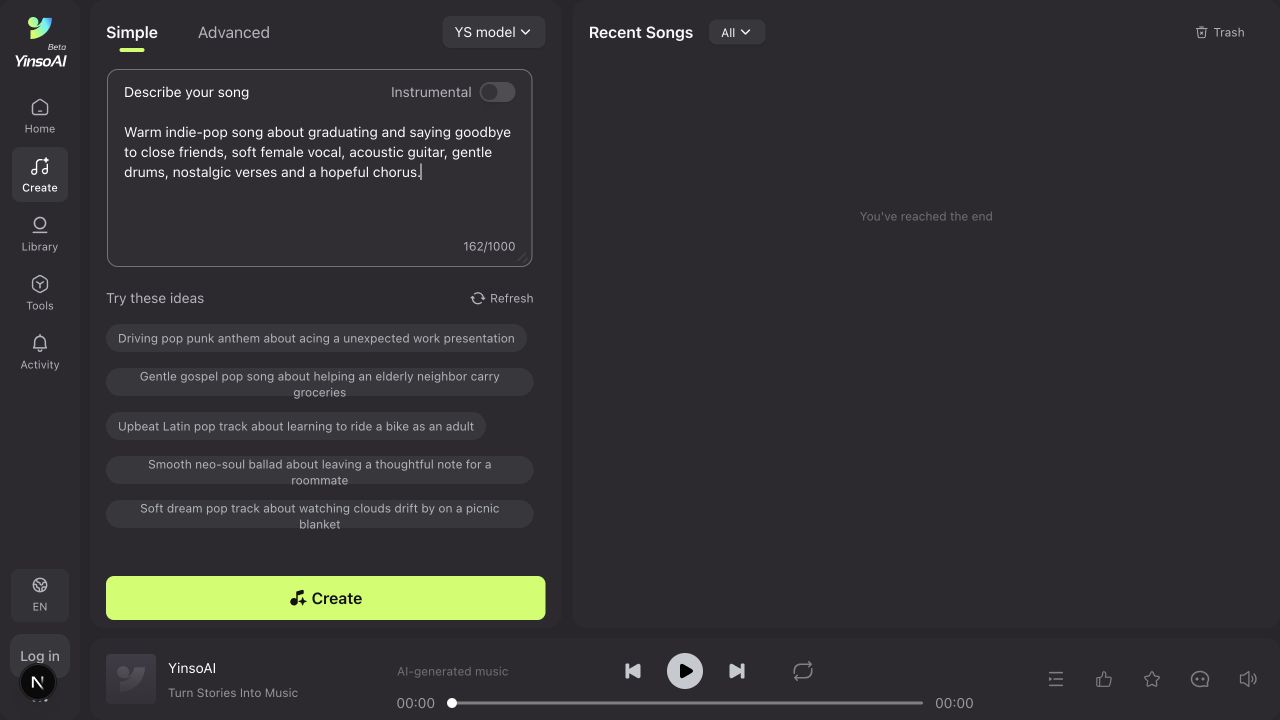
Simple mode example: a graduation goodbye song
Copyable prompt
One paragraph is enough
Warm indie-pop song about graduating and saying goodbye to close friends, soft female vocal, acoustic guitar, gentle drums, nostalgic verses and a hopeful chorus.
Subject
Graduating and saying goodbye
Genre
Warm indie pop
Vocal
Soft female vocal
Arrangement
Acoustic guitar and gentle drums
Emotional arc
Nostalgic verses, hopeful chorus
Instrumental toggle
Off, because this is a vocal song
04
How to use Lyrics Creation
The product labels this workflow Advanced. It separates the words from the musical direction. You do not need a finished lyric: use AI conversation to turn your idea into words, then enhance the style prompt to bring the sound closer to what you have in mind.
- 1
Open Advanced mode
Choose Advanced to work on the lyrics and musical direction separately. You can bring finished lyrics or start with an idea and develop it with AI.
- 2
Write your lyrics or choose Write with AI
Use Write with AI beside Lyrics to describe your story, mood and audience. Continue the conversation to revise a verse, strengthen the chorus or add personal details, then choose Fill into creation area on the suggestion you want to use.
- 3
Review the words and sections
Check the lyrics in the creation area. Keep labels such as [Verse], [Pre-Chorus], [Chorus] and [Bridge], and edit any lines that do not express your idea or feel natural to sing.
- 4
Refine Styles with Enhance Prompt
Describe the genre, instruments, mood and vocal delivery in Styles. Select Enhance Prompt to have AI rewrite that direction, then review and edit the result before generating.
- 5
Set the vocal direction
Choose the available vocal setting that fits the song. Tone and delivery—intimate, bright, restrained or raw—are often more useful than gender alone.
- 6
Generate, listen and refine
Listen for whether the words fit naturally, the chorus lands clearly and the arrangement leaves space for the vocal. Return to the AI conversation or adjust Styles when the result needs work.
Develop your lyrics through a conversation with AI
Select Write with AI beside Lyrics. Sign in if prompted, describe your idea and press Enter to send. Follow-up messages use the conversation context, so you can keep refining the same song instead of starting over.
Example messages you can send
1. Start with the idea
Help me write an English graduation song for close friends. Include packing our notes, one last walk through the hallway and moving to different cities. Make it nostalgic but hopeful, with verses and a singalong chorus.
2. Give specific feedback
Make the chorus shorter and easier to sing. Keep the idea that our friends still feel like home, even when we live far apart.
3. Refine one part
Keep the verses and chorus. Add a bridge about calling a friend when a new town feels lonely. Use simple, conversational language.
When a suggestion expresses your idea, select Fill into creation area. Review the returned Lyrics and Styles, keep the details that matter and edit anything you would not say yourself. The messages above are writing examples, not a transcript of the song case below.
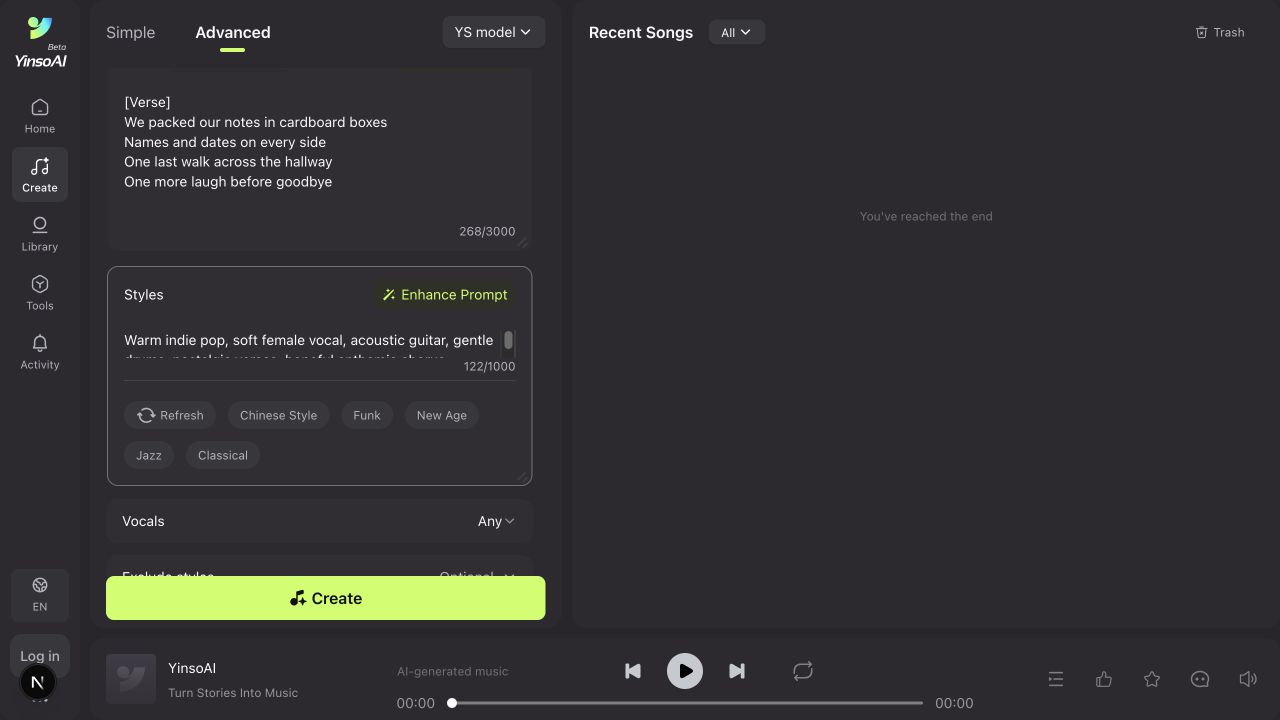
Use Enhance Prompt to refine the musical direction
In Styles, describe the sound in your own words, then select Enhance Prompt. AI rewrites the text in that field. Keep a copy of the original if you want to compare, then check that the enhanced version still matches your idea.
Example starting prompt
Give AI a clear direction to enhance
Warm indie pop for a graduation goodbye, soft intimate female vocals, acoustic guitar and gentle drums. Nostalgic verses, a hopeful chorus, medium tempo and a gentle ending.
- Keep the genre, mood and vocal delivery that fit your song.
- Review any added instruments or arrangement details; remove those you do not want.
- Keep the music prompt in Styles and the words to be sung in Lyrics.
- Generate and listen, then change one detail if the result is still far from your idea.
Enhancement can make your instructions clearer, but it does not guarantee the ideal result. Your feedback, edits and listening decisions guide the next version.
05
Lyrics mode example: Carry You With Me
Lyrics input
The words used in this song
[Verse 1] We packed our notes in cardboard boxes Wrote our names along the sides One last walk across the hallway One more laugh before goodbye [Pre-Chorus] The bell will ring for someone new But every room remembers you [Chorus] Here's to all the roads before us Here's to every friend we found Though the miles may fall between us You're the home I carry now
Read the remaining lyrics
[Verse 2] There's a photo in my jacket From a night we missed the train We were scared to say tomorrow Now we're learning how to change [Pre-Chorus] The map is wider than we knew There's room for me and room for you [Chorus] Here's to all the roads before us Here's to every friend we found Though the miles may fall between us You're the home I carry now [Bridge] If a new town makes you lonely If the plans don't quite come true Call me when the streetlights flicker I'll stay on the line with you [Final Chorus] Here's to all the roads before us Here's to every friend we found Though the miles may fall between us You're the home I carry now [Outro] Fold the photo, close the door Take this love to something more
Styles input
The musical direction used
Warm indie pop, intimate soft female vocals, fingerpicked acoustic guitar, gentle brushed drums, rounded bass, subtle piano. Mid-tempo, nostalgic and conversational verses, a hopeful singalong chorus with light harmonies. Organic production, clear vocals, restrained dynamics, gentle ending.
The lyrics supply specific memories: packing notes, walking through the hallway and missing a train. Styles supplies the instruments, vocal delivery and emotional arc.
When listening, compare the verse phrasing with the chorus and check how the arrangement supports the words. Use the same structure with your own memories for a new song.
06
Write lyrics that are easier to sing
- Use section labels such as [Verse], [Pre-Chorus], [Chorus] and [Bridge].
- Keep each line short enough to speak comfortably in one breath.
- Let the verse add details and let the chorus state the central feeling.
- Repeat the core chorus wording so the hook is recognizable.
- Read the lyrics aloud and shorten lines that feel crowded or unnatural.
- Use concrete images—a packed box, an empty hallway, the last train—instead of only abstract emotion.
A useful test
Tap a steady beat and read each line aloud. If you have to rush several words, split the line or remove one detail. Clear phrasing gives the generated vocal more room to sound intentional.
07
How to improve the generated song
The song feels generic
Add one distinctive scene, instrument or emotional contrast instead of adding more broad adjectives.
The chorus does not stand out
Ask for a wider, more anthemic chorus and keep its lyric wording shorter and more repeatable.
The vocal sounds too dramatic
Change the delivery to intimate, restrained, conversational or gently expressive.
The words feel rushed
Shorten long lines, remove filler words and keep the syllable density similar across neighboring lines.
The arrangement is too busy
Name only two or three main instruments and ask for a minimal arrangement with space around the vocal.
The next version changes too much
Change one variable at a time—first the vocal, then the tempo, then the instrumentation—so you can hear what helped.
Have a reference but cannot describe it? First use the Audio to Music Prompt tutorial, then bring the result into Simple or Advanced mode.
08
Frequently asked questions
Should beginners use Simple or Advanced mode?
Start with Simple for a quick song from one description. Use Advanced when you want to develop the lyrics and style separately, either by writing them yourself or with AI assistance.
Can Simple mode create a song with vocals?
Yes. Leave Instrumental off and describe the vocal tone, subject and chorus you want.
Do I need to write complete lyrics in Advanced mode?
No. Choose Write with AI to develop lyrics from your idea through a conversation, or enter your own draft. Review the suggested words and use Fill into creation area before generating.
Can I ask AI to revise only part of the lyrics?
Yes. In Write with AI, explain what should change and what should stay. For example, ask for a more hopeful chorus while keeping the verses and their personal details.
What does Enhance Prompt do?
Enhance Prompt rewrites the description in Styles to clarify the musical direction. It replaces that field, so keep a copy if you want to compare versions. Review the result and remove details that do not fit your intent; a longer prompt does not guarantee a better song.
What should go in the Styles field?
Describe genre, mood, tempo, key instruments, vocal delivery and arrangement. Do not paste the full lyrics into Styles.
How long should each lyric line be?
Use lines that can be sung in one comfortable phrase. If a line feels crowded when spoken aloud, shorten it or split it into two lines.
Can I make instrumental music?
Yes. In Simple mode, turn on Instrumental. Focus the description on mood, tempo, instruments, energy and intended use.
Why does the generated vocal change my words?
Long or rhythmically crowded lines may be compressed or reshaped. Use clearer sections, shorter lines and repeated chorus wording when exact phrasing matters.
Your idea already contains the first line
Turn a sentence or finished lyrics into a song
Use Simple for a quick idea, or shape your lyrics with Write with AI in Advanced. Enhance the musical direction, listen and refine.
Start creating with YinsoAI