The short answer
01
What does the Music Prompt Analyzer do?
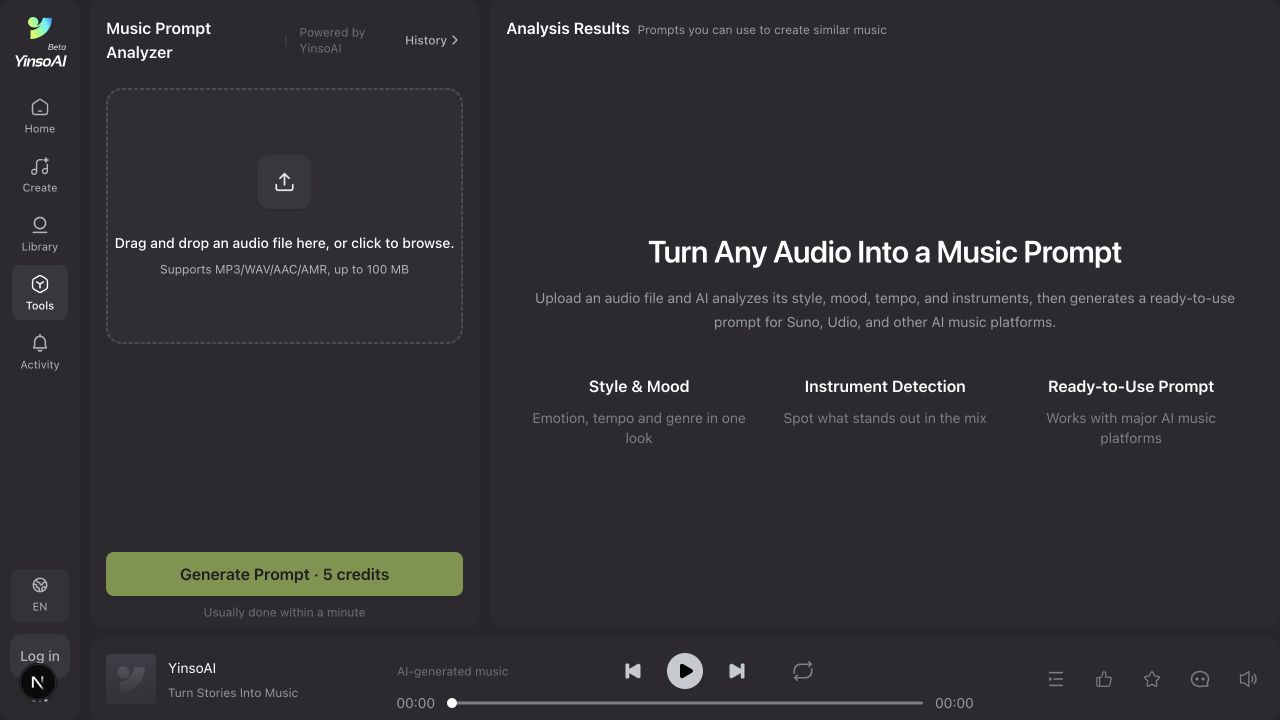
YinsoAI Music Prompt Analyzer converts audio into a written creative brief. Instead of guessing how to describe a track, you receive language for the genre, emotional tone, pace, instruments, vocal character and production texture.
The result is useful when you can hear the direction you want but do not know the music terminology. It also helps turn a reference into editable words, so you can keep the atmosphere while replacing the story and arrangement details.
Style and mood
Describe the genre, energy and emotional direction.
Sound details
Surface tempo, instruments, vocals and production texture.
Reusable prompt
Copy the result or send it directly into song creation.
02
Prepare the right audio reference
A better reference produces a more useful description. You do not need a mastered studio file, but the section should clearly contain the qualities you want to analyze.
- Use MP3, WAV, AAC or AMR and keep the file below 100 MB.
- Choose a section where the main rhythm, instruments and vocal character are audible.
- Avoid heavy background noise, spoken introductions or long silence.
- Use audio you have permission to upload and do not include private recordings without consent.
03
How to generate a music prompt from audio
- 1
Choose a useful reference track
Pick a clear audio file that represents the genre, mood, rhythm or instrumentation you want to understand. Avoid a noisy recording when the mix itself is not the creative reference.
- 2
Upload the audio
Open Music Prompt Analyzer and drag the file into the upload area, or click to browse. YinsoAI accepts MP3, WAV, AAC and AMR files up to 100 MB.
- 3
Generate the prompt
Select Generate Prompt. The analysis spends credits from your balance and usually completes within a minute.
- 4
Read the musical description
Analysis Results returns a GETI prompt you can switch between English (recommended) and Chinese, plus a Descriptive prompt covering style, mood, tempo, instruments and production. Treat the result as a creative description, not a forensic identification of every sound.
- 5
Copy or create with the prompt
Use Copy to take the English prompt into another workflow, or Send to Create to move it into YinsoAI song creation. Change the story, vocal direction or use case before generating your own track.
04
Example: reverse a dreamy indie-pop reference
This example shows how to turn an audible direction into a prompt without asking for a copy of a specific song.
Example input
Reference characteristics
A mid-tempo track with soft female vocals, hazy synth pads, clean electric guitar, restrained drums and a warm nostalgic mood.
Illustrative output
Reusable music prompt
Dreamy indie-pop with an intimate female vocal, warm analog synth pads, clean chorus guitar, rounded bass and restrained live drums. Mid-tempo, nostalgic and gently hopeful, with spacious verses and a wider melodic chorus.
This sample demonstrates the expected level of detail; actual analysis varies with the uploaded audio.
05
Turn the analysis into an original song
The analyzer describes sound. Your next step is to add a new creative purpose. Keep the useful musical traits, then supply an original subject, lyric direction or scene.
Before
Dreamy indie-pop, soft vocal, warm synth pads, clean guitar, mid-tempo and nostalgic.
After adding your own idea
Dreamy indie-pop song about finding an old disposable camera after moving home. Intimate female vocal, warm synth pads, clean chorus guitar, restrained drums, nostalgic verses and a gently hopeful chorus.
Choose Send to Create in the results panel to move the prompt into YinsoAI, or read the Simple and Advanced creation tutorial for the next step. Picking Compare Models there runs the same prompt through several models so you can hear which one suits the reference.
06
How to improve weak analysis results
The prompt feels generic
Analyze a section with a clearer hook or arrangement, then add the distinctive instrument or production texture manually. You can also paste it into Styles on the Create page and use Enhance Prompt to rewrite it.
An instrument is missing
Dense mixes hide individual parts. Treat the output as a draft and add the instrument you can clearly hear.
The mood feels wrong
Replace broad emotion words with precise ones such as bittersweet, restrained, quietly confident or tense but controlled.
The new song feels too similar
Change the subject, structure, vocal direction and one major instrument. Use the reference as vocabulary, not as a blueprint.
07
Frequently asked questions
What is a music prompt analyzer?
It is a tool that listens to an audio reference and turns its audible characteristics—such as genre, mood, tempo and instrumentation—into a written prompt for AI music creation.
Which audio formats can I upload?
YinsoAI currently supports MP3, WAV, AAC and AMR files up to 100 MB.
What language is the prompt in?
The GETI prompt opens in English, which is the recommended option, and switches to Chinese in the same card. Below it, the Descriptive prompt gives the fuller style analysis. Copy the English version when you plan to paste it into another generator.
Can it identify the exact song or artist?
The purpose is to describe musical characteristics for creation. It should not be treated as a song-identification, copyright or authorship tool.
Can I use the prompt in Suno or Udio?
Yes. The generated English prompt is designed to be reusable in major AI music platforms, although each platform may interpret the same wording differently.
Why does the output miss an instrument?
Dense mixes, effects and overlapping sounds can make individual elements difficult to distinguish. Try a cleaner section or add the missing instrument manually.
Should I copy the prompt without editing it?
Use it as a strong first draft. Replace reference-specific details with your own story, vocal, structure and intended use to create a more original result.
Hear it, describe it, remake the direction
Create a useful prompt from your reference
Upload a track, understand its musical ingredients and carry the strongest ideas into an original song.
Open Music Prompt Analyzer